What is a height adjustable table?
A desk or table that allows users to change its height, enabling transitions between sitting and standing positions.
Are height adjustable tables required in workplaces?
Not mandatory, but highly recommended for ergonomic flexibility and health benefits.
What's the difference between a height adjustable table and a riser/platform?
A desk adjusts the entire surface; a riser/platform sits on top of an existing desk and adjusts only the monitor/keyboard height.
Do height adjustable tables improve health?
Yes. They promote posture changes, reduce back pain, and improve circulation. However, standing all day isn't ideal either—alternating positions is key.
How often should I switch between sitting and standing?
Every 30-45 minutes is recommended. Standing for 15-20 minutes at a time is ideal
Why Use a Height Adjustable Table?
1. Promotes Health
-
Reduces Sedentary Time: Alternating between sitting and standing helps combat the negative effects of prolonged sitting, such as back pain and poor posture.
-
Improves Circulation: Standing periodically encourages better blood flow and energy levels.
-
Supports Ergonomic Practices While Standing or Sitting: Allows users to adjust the desk to their ideal working height, reducing strain on the neck, shoulders, and wrists when seated or when standing.
2. Boosts Productivity & Focus
-
Increased Alertness: Standing can help employees feel more engaged and focused, especially during long meetings or training sessions.
-
Task Flexibility: Employees can switch positions based on the task—standing for collaborative work, sitting for deep focus.
3. Future-proof Workstation
-
Same station can be adjusted/customized and used by individuals of various heights.
How to Select a Height Adjustable Table
1. Ergonomics & Adjustability
-
Height Range: Ensure the desk accommodates a wide range of user heights, ideally from sitting to standing (typically 22"-48").
-
Ease of Adjustment: Look for electric motors with smooth, quiet operation. Manual crank systems are less ideal for frequent use.
-
Programmable Settings: Some models allow users to save preferred heights, which is great for shared workstations.
2. Build Quality & Stability
-
Frame Material: Steel frames offer better durability and stability.
-
Weight Capacity: Consider the equipment that will be placed on the desk (monitors, training materials, etc.).
-
Wobble Factor: Test for lateral stability, especially at full height.
3. Design & Aesthetics
-
Surface Material: Laminate, wood veneer, or solid wood—choose based on durability and corporate style.
-
Cable Management: Add-on vertical and/or horizontal cable management systems help maintain an able clean, professional look.
-
Finish Options: Match with existing office furniture and branding.
4. Workspace Configuration
-
Size & Shape: Consider L-shaped, rectangular, or modular setups depending on room layout.
-
Mobility: Casters can be helpful for flexible training environments.
-
Privacy Panels: Optional for semi-private workstations.
Table Measurements
Measure the available space to assure the table will fit without obstruction when used.
| Series |
Configuration |
Adjustment |
Lifting Capacity |
Height Range* |
Applications / Ideal for: |
| All-Flex |
2-Leg / 3-Leg |
Electric |
265 lb. / 330 lb. |
23.3” - 49.3” |
- Application 1
- Application 2
|
| Victory LX |
2-Leg / 3-Leg |
Electric |
250 lb. / 360 lb. |
21.5” - 47.5” |
|
| Triumph LX |
2-Leg / Disc |
Electric |
250 lb. |
26.5” - 43.5” |
- Application 1
- Application 2
|
Rejuve: 2 stage
Rejuve: 3 stage |
2-Leg
3-Leg |
Electric |
220 lb. |
26.5” - 43.5”
21.5” - 47.5” |
- Application 1
- Application 2
|
| Trada |
2-Leg / 3-Leg |
Electric |
265 lb. / 397 lb. |
24.5” - 50” |
|
| Levado |
2-Leg |
Electric |
220 lb. |
24.5” - 48.5” |
- Application 1
- Application 2
|
| Espree |
2-Leg |
Pneumatic |
44 - 143 lb.
52 - 163 lb |
26.3” - 45.8” |
- No power, open floor-plan
- Application 2
|
| Q Crank |
2-Leg |
Manual |
220 lb. |
24.8” - 42.3” |
- No power, open floor-plan
- Application 2
|
| Motific |
Single Base |
Pneumatic |
25 lb. |
22.5” - 27.8” |
- Application 1
- Application 2
|
*Height range does not include the thickness of the worksurface
What to consider when selecting a HAT
The envelope: actual vs. nominal dimensions
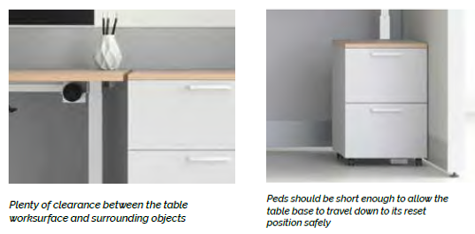
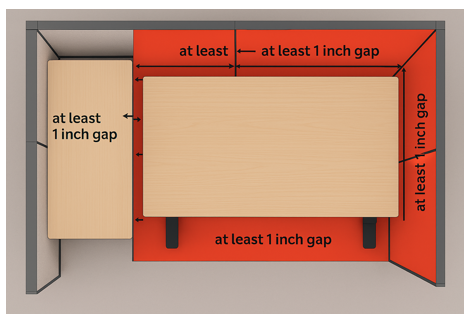
Should have a 1” clearance on sides and back of worksurface to avoid any obstructions.
To ensure compatibility with height-adjustable environments, base dimensions must be specified as nominal values. This means:
-
1.0” must be subtracted from both the width and depth of the worksurface to allow for movement clearance.
-
For example, a worksurface listed as 30.0”D x 60.0”W should actually be 29.0”D x 59.0”W.
-
This adjustment prevents the worksurface from catching on edges as it moves up and down.
Fellowes worksurfaces are made to exact dimensions. If nominal sizing is needed, please specify when ordering. TFL worksurfaces are 1.0" thick. HPL worksurfaces are 1.125" thick.
Retrofitting Existing Workstations
Never take an existing top that is wedged between two surfaces (cantilevered) and offer a base under it. It will more than likely catch an edge and turn into a problem for your end user. Research having the top cut down and re-edge-banded to ensure you have a nominal measurement.
Wiggle Room
Ensure there is some space around worksurfaces to prevent the table from catching an edge while transitioning from sit-to-stand.
What is the difference between a 2 stage and 3 stage height adjustable table?
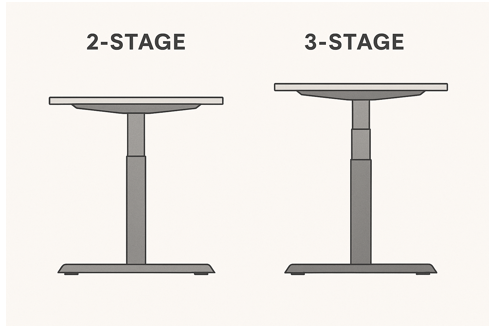
2-Stage Column
-
Has two telescoping segments.
-
Offers a moderate height range (typically ~27" to 46").
-
Often more cost-effective.
-
Suitable for users of average height.
3-Stage Column
-
Has three telescoping segments.
-
Provides a wider height range (typically ~22" to 48"+).
-
More ergonomic for both shorter and taller users.
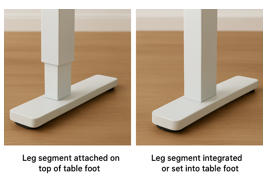
Some height adjustable tables have the wider leg segment at the bottom, and others have the narrower leg segment at the bottom. What is the difference?
Stability - While tables with a wider leg segment at the bottom may provide additional stability, any of today's quality height adjustable tables will be secure regardless of leg segmentation.
Aesthetics - Some users may prefer the look of one leg segmentation over the other, however, performance should not be any different.
Some height adjustable tables have the telescoping leg section mounted on top of the foot compared to others that are integrated into the foot. Which is better?
Stability - While tables with an integrated leg and foot assembly may provide additional stability, any of today's quality height adjustable tables will be secure regardless of the attachment method.
Aesthetics - Some users may prefer the look of one attachment method over the other, however, performance should not be any different.
What shapes are height adjustable tables available in, and what is the purpose?
Office desk work surfaces come in a variety of shapes, each designed to support different work styles, spatial layouts, and ergonomic needs.
The most common desk shapes and their intended purposes:
Rectangular
Purpose: Classic and versatile; fits most office layouts.
Best for: General use, shared workspaces, and minimal setups.
Pros: Easy to place against walls or in rows; simple and cost-effective.
L-Shaped
Purpose: Provides two connected surfaces—ideal for multitasking.
Best for: Corner offices, users who need space for both computer work and paperwork.
Pros: Efficient use of corner space; separates tasks (e.g., monitor on one side, writing on the other).
Corner (or Wedge)
Purpose: Fits snugly into corners with a curved or angled front.
Best for: Small offices or cubicles.
Pros: Saves space; ergonomic reach to all areas.
120-Degree
Purpose: Used in open-plan offices to form “pods”.
Best for: fostering collaboration.
Pros: still provides individual adjustability.
Peninsula or Extended Surface
Purpose: Adds a meeting or collaboration area to a desk.
Best for: Managers or team leads who host quick meetings.
Pros: Encourages interaction; adds visual interest.
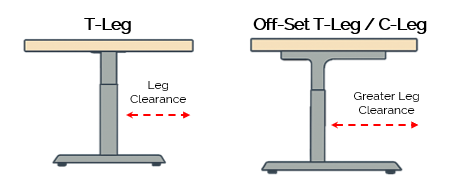
What is the difference between a “T-leg” shaped and “C-leg” shaped height adjustable table?
Design:
The legs form a "T" shape when viewed from the side. The vertical column is centered over a horizontal foot.
Benefits:
Symmetrical support: Offers balanced weight distribution.
Stability: Often more stable, especially for heavier loads or wider desks.
Ideal for dual-leg setups: Common in sit-stand desks.
Considerations:
The centered column may slightly reduce legroom or interfere with under-desk accessories.
Off-Set T-Leg / C-Leg Height Adjustable Table
Remember: configuration must achieve BIFMA certification
Design:
The vertical column is offset toward the rear of the foot, forming a "C" shape.
Often used in modular office furniture systems.
Benefits:
More legroom: The offset design allows for better clearance under the desk. as the column is set back providing greater leg clearance.
Cable management: Easier to route cables and mount accessories.
Better for shared workspaces: Allows more flexibility in layout.
Considerations:
Slightly less stable than T-leg designs, especially if heavily loaded or used with wide surfaces.
What control features come with an electric height adjustable table?
Basic Up/Down Controls
Two-button interface: Simple buttons for raising and lowering the desk.
Touch-sensitive or mechanical: Depending on the model, buttons may be physical or capacitive touch.
Programmable Height Presets
Memory settings: Usually 2 to 4 programmable presets that allow users to save preferred sitting and standing heights.
One-touch recall: Pressing a preset button automatically moves the desk to the saved height.
Digital Display
Height readout: Shows the current desk height in inches or centimeters.
Feedback: May display error codes or system status messages.
Anti-Collision Detection
Safety feature: Automatically stops and reverses movement if the desk encounters an obstruction.
Sensor types: Can be mechanical (resistance-based) or gyroscopic (motion-based).
Soft Start/Stop Motion
Smooth transitions: Prevents abrupt movements for better stability and comfort.
What are Fellowes worksurfaces made of?
Laminate
High-Pressure Laminate - HPL or Thermally Fused Laminate - TFL
Advantages
Durable: Resistant to scratches, stains, and moisture.
Variety: Available in many colors, textures, and woodgrain patterns.
Easy to clean: Low maintenance surface.
Can you use casters on a height adjustable table?
Yes, casters are usually an option for tables. They are often used on non-electric height adjustable tables. Casters provide easy mobility for reconfiguring work areas, and for cleaning.
What is BIFMA certification?
BIFMA certification for height-adjustable tables involves independent testing to verify that the desks meet established standards for safety, durability, stability, and ergonomics. These rigorous tests, accredited by ANSI, ensure that height-adjustable desks can safely withstand thousands of cycles of raising and lowering, support intended weight capacities, and provide a stable, reliable experience for the user over their lifespan.
Business and Institutional Furniture Manufacturers Association
(BIFMA) is an industry organization that develops and accredits standards for office furniture.
ANSI/BIFMA
Standards are comprehensive guidelines for furniture performance and safety.
What other considerations should be made regarding height adjustable tables?
Available Power
If you are using motorized height adjustable tables confirm power will be available in the table's location - particularly if located in the center of a room. Optimize floorplans by utilizing Railway data and power rails.
Local Codes
As with any electrical device, make sure the height adjustable table meets/exceeds all electrical codes. Cities, such as Chicago, IL, require specific labeling for certified electric height adjustable tables.
Table Assembly
Level of Assembly Required - Some height-adjustable tables are significantly easier to assemble than others, primarily due to the degree of pre-assembly and the overall quality of the parts.
Consider Table Base Position & Adaptability of Accessories
Before attaching accessories such as privacy screens, desktop power units, wire management, monitor arms, CPU holders, or keyboard trays, ensure that the height-adjustable table base does not interfere with mounting them to the worksurface.
Set up a Test Workstation
To make sure everything fits and works well, ask for product samples and set up a test version of the workstation before placing your order.