Your Home Office Checklist - Everything You Need to Work Smarter
Your Home Office Checklist - Everything You Need to Work Smarter
Remote and hybrid working have become a routine part of professional life, but just because you're working from home, doesn’t mean your workspace is helping you do your best work.
The question that many people are left pondering is, what exactly do they need in a home office that supports both comfort and productivity?
The key lies in ergonomics and ensuring your space works with your body, not against it. With the right setup, you can stay focused, avoid discomfort, and maintain energy throughout the day. To help you get there, we’ve created this practical home office checklist, based on the Fellowes Workspace Zone Approach™: a proven framework to improve how we work
RECOMMENDED BY THE FELLOWES WORKLIFE COACH
Understanding the Workspace Zone Approach™ to ergonomic workings
The Fellowes Workspace Zone Approach™ breaks down your home workspace into key areas of focus:
By addressing each of these areas, you’ll create a more supportive home office setup, no matter your work style.
Your essential home office setup checklist
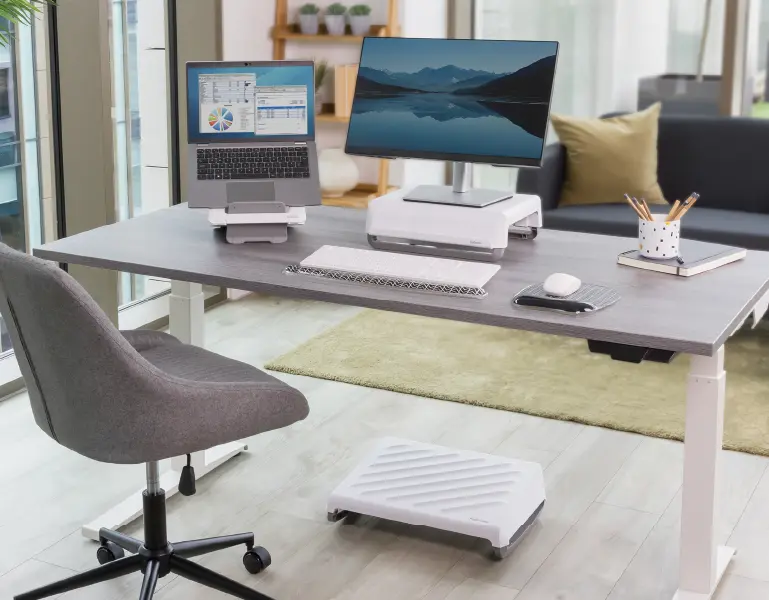
Ergonomic chair with lumbar support
A strong foundation starts with a chair that supports the natural curve of your spine. A seat cushion or adjustable back support, such as the Fellowes Breyta™ Comfort Cushion, can provide extra comfort and alignment.
Footrests
If your feet don’t reach the floor, a footrest will help align your posture and reduce pressure on the lower back. It also encourages movement and better circulation throughout the day.
Wrist supports and mouse pads
Typing and using a mouse all day can cause strain in the wrists and forearms. Products like Breyta™ Wrist Rests and mousepads provide cushioning to keep your wrists in a neutral position and help prevent any discomfort from arising.
Ergonomic mice
Our ergonomic mice are designed to encourage vertical alignment, which supports a more ergonomic operating position.
Desk Mats
Desk mats not only help reduce glare and protect your work surfaces but improve mousing performance and comfort with their soft and uniform surface. Ideal for precision mouse tracking.
Monitor and laptop stands and arms
Having a screen that is causing you to look down can cause strain to the neck over time. Use a monitor stand or laptop stand to keep your screen at eye level and your head aligned with your spine to ease any strain on your neck and shoulders. Monitor arms offer greater flexibility and adjustment ranges whilst also freeing up valuable workspace.
Document holder
Fellowes document holders keep papers aligned next to your screen, reducing repetitive neck movements.
Appropriate lighting
Screen glare, caused by external light, or low lighting can result in you being more likely to lean forward or squint. With that in mind, it’s worthwhile considering the position of your screen relative to its surroundings and possibly investing in a desk lamp to help reduce neck strain caused by awkward head positions.
Sit-stand desk or workstation
Remaining seated throughout the day can lead to fatigue and stiffness. A sit-stand solution like the Fellowes Lotus™ LT Workstation lets you switch positions and boost circulation throughout the day, but we have many other sit-stand options for you to explore.
Reminders to move
A timer or phone alert can prompt regular standing, stretching, or walking breaks. Or a well-placed sticky note can prompt you to get up and move throughout the day.
To work smarter from your home office, you need to combine ergonomic equipment with healthy habits that encourage movement.
Desktop Power Solutions
Bending and twisting under your desk can cause strain and injury. Our range of desktop power solutions is designed to make staying charged effortless. Fellowes Power Spot is designed to keep charging access at your fingertips whilst seamlessly hiding out of sight when not in use.
Cable Managers
With the growing number of devices we use, cable clutter can be a real issue at your workspace. Tidy up your cable mess with cable managers designed to organise and conceal cables and avoid potential trip hazards.
CPU Holders
With ever shrinking workspaces, its vital to maximise the space we do have. Consider mounting your CPU or thin client under your desk behind your screen, or on a monitor pole to free up valuable desk space for you to work ergonomically.
Maintaining a healthy home office in the long-term
Setting up your workspace is one thing, but maintaining it is equally important. Here are a few simple tips to help you stay comfortable and productive in your home office workstation:
- Reassess your posture throughout the day, as small changes can make a massive difference
- Take regular breaks to move your body and reset your posture
- Keep your desk clear of any unnecessary clutter and keep things that you use regularly within arm's reach
- Utilise cable management solutions to help you tame cords and maintain a safer, cleaner workspace
What do you really need in a home office?
So, what do you need for a home office that works? It is certainly not as simple as just a desk and a chair, but more of a setup that supports your health and productivity across all ergonomic zones (as outlined by the Fellowes Workspace Zone Approach™ ).
From reducing back tension to encouraging regular movement, every element of your workspace should help you work smarter and feel better and not work against you.
At Fellowes, we offer a wide range of ergonomic solutions that can help you achieve the very best home office set up. From back supports and wrist rests to sit-stand desks and monitor risers, all are there to help you create the perfect home working environment.
Explore the full range of Fellowes ergonomic products and discover what your home office really needs to truly be the very best.