10 Tips on How to Have the Best Posture at Work
10 Tips on How to Have the Best Posture at Work
When you’re working from an office or even your kitchen table, having good posture is an important consideration for comfort and productivity. Bad posture can mean neck strain, backache, wrist tension, and fatigue, which negatively affect your wellbeing and output. So, what is the best posture for desk work? Let’s find out!
RECOMMENDED BY THE FELLOWES WORKLIFE COACH
Why does posture matter?
Posture plays a key role in how you feel and function during the workday. No matter your working environment, be it working from home, using a laptop on-the-go, or sitting at a desk, these posture tips can offer real improvements.
Let’s explore how you can ensure you maintain the appropriate posture at work, broken down by ergonomic zones, as seen in
Fellowes Workspace Zone Approach™.
1
Tip 1 - Use a chair with proper lumbar support
The best posture for office work starts with the right chair. Choose one that supports the natural curve of your spine, or add a back, seat, or lumbar support cushion to your existing seat.
Sit back, don’t lean forward - Leaning forward compresses your spine and tires out your lower back. Sit back in your chair with your back fully supported, while keeping your shoulders relaxed and in a natural position. You can also set a timer to remind yourself to check your current posture every 30 minutes.
2
Tip 2 - Use a foot rest for correct posture
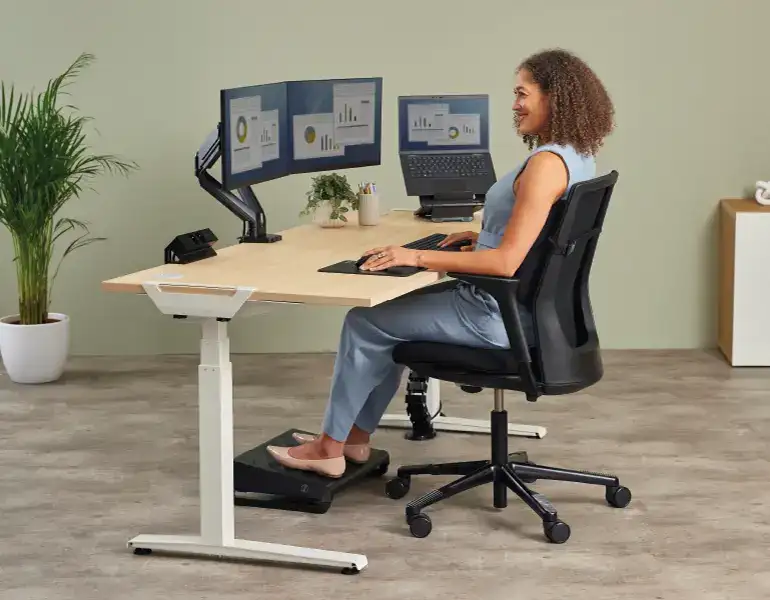
Crossing your legs can misalign your spine and reduce circulation. Your feet should rest flat on the floor, with knees bent at a 90° angle. If your chair is too high, then a foot rest can help improve posture and allow for healthy circulation.
3
Tip 3 - Keep your arms at a 90° angle
To ensure the best posture while working on a computer, make sure your forearms are parallel to the floor, elbows are close to the body, and wrists are in line with your hands. You can adjust your chair, or your height adjustable desk if you have one, to main this alignment through the day.
4
Tip 4 - Support your wrists while mousing and typing
Typing for a long time without wrist support can lead to strain, but there are solutions readily available to tackle this. You can use wrist rests or vertical mice to support your hand and wrist in a comfortable position whilst typing and mousing throughout the working day.
5
Tip 5 - Raise your screen to eye level
If you're having to bend your neck to look down at your monitor or laptop, then it's time to raise your screen. Use a monitor stand or laptop stand to bring your screen to eye level, which will help keep your neck in a neutral position and will ease shoulder tension.
6
Tip 6 - Keep your screen at arm’s length
Position your monitor around an arm’s length away to prevent any eye strain and neck pain. It also avoids hunching and helps you to maintain a more upright seated position.
7
Tip 7 - Lift your paper work off the desk
Similar to your screen, if you're bending and twisting to read what's on your desk then you'd benefit from using a document holder or writing slope. By moving paper work to eye level or in line with your screen, you'll be able to work more ergonomically and reduce neck and eye strain.
8
Tip 8 - Alternate between sitting and standing
Working from home usually means that you’re sat at your desk for long hours, so make sure you change your position throughout the day. Ergonomic experts recommend that for every 30 minutes of work, employees should aim to sit for 20 minutes, stand for 8 minutes, and move for at least 2 minutes to promote circulation and reduce the strain associated with prolonged sitting.
You can use a sit-stand desk to switch between sitting and standing positions, promoting better circulation and reducing the risks associated with stationary behaviour.
9
Tip 9 - Take micro-breaks and stretch
Even with the correct posture, when working with a computer or laptop static positions can still cause discomfort. Get up every 30–60 minutes, stretch your spine, roll your shoulders, or walk for a few minutes. You can also use apps to prompt breaks.
10
Tip 10 - Maximise your workspace.
Keep the things you use regularly within arms reach like desktop power and move the things you use less often off your desk altogether.
Effective cable management and CPU holders can help keep you organised and tangle free leaving you plenty of space to work ergonomically and free of obstructions.
What’s the best posture for working?
So, what is widely regarded as the best posture at your work desk? Sit in a neutral position with your back supported, monitor at eye level, feet flat, and arms relaxed. It really is that simple.
And the best posture for when you’re only working with a laptop? The above rules still apply, but introduce the use of aids such as an ergonomic mouse, external keyboard, and a laptop riser.
Improve your posture with Fellowes Healthy Workstation Assessment
You don’t need a complete workstation revamp to have the best posture while working. Utilising key ergonomic equipment and employing some mindful habits throughout the day will do wonders.
Whether you are setting up a full office or simply enhancing your workspace, our free Healthy Workstation Assessment will pinpoint the areas you should tackle first. It takes less than 5 minutes to complete, and you’ll receive personalised recommendations to help you achieve the best posture at work.
Take our free Healthy Workstation Assessment