How to Set Up The Perfect Home Office:
How to make your home office healthy and comfortable
How to Set Up The Perfect Home Office: How to make your home office healthy and comfortable
When planning your home office setup, it's more important than ever to consider ergonomics and how it can impact not just your work life, but your overall well-being as well.
Whether you work from home full-time or on a hybrid basis, creating an ergonomic environment can significantly reduce strain on your body and enhance focus. This allows you to work for longer periods without pain and discomfort encroaching on your schedule.
In this guide, we’ll walk you through our advice on how to create the most ergonomically friendly home office by utilising tools like the Fellowes Workspace Zone Approach ®
, a comprehensive framework that ensures you are equipped with all the tools for a healthier, more productive workspace.
We will also discuss the essential ergonomic principles we should all adhere to, and the must-have products in our range to transform your home office set-up.
RECOMMENDED BY THE FELLOWES WORKLIFE COACH
Adopting an ergonomics-first approach to designing your home office
A well-designed home office shouldn’t just be about creating a stylish workspace, but also a space that promotes productivity while maintaining your health.
People spend more time at their desks than ever before, meaning that improper posture and uncomfortable workstations can lead to a range of physical health problems that don’t stop at just back pain, but eye strain and repetitive stress injuries, too.
An ergonomic set-up plays a key role in reducing physical discomfort by supporting healthy posture and encouraging regular movement and breaks throughout the day. When you're physically comfortable and free from strain, it becomes easier to focus and stay productive.
Alongside this, introducing elements such as natural light, indoor plants, and thoughtful office design can contribute to a more positive work environment. Together, this will help to boost concentration and overall well-being. It’s not just about ergonomics but creating a workspace that supports both body and mind
Start your home office ergonomic journey with a Healthy Workstation Assessment
Before you decide which ergonomic products are best suited to you, it is essential to first understand your current workstation setup and identify any potential risks. The Fellowes Healthy Workstation Assessment is a simple yet effective way to evaluate your workspace and ensure it supports your health, comfort, and productivity.
Conducting a healthy workstation assessment will help pinpoint the areas that require adjustment, whether that is your desk height, monitor position or seating posture.
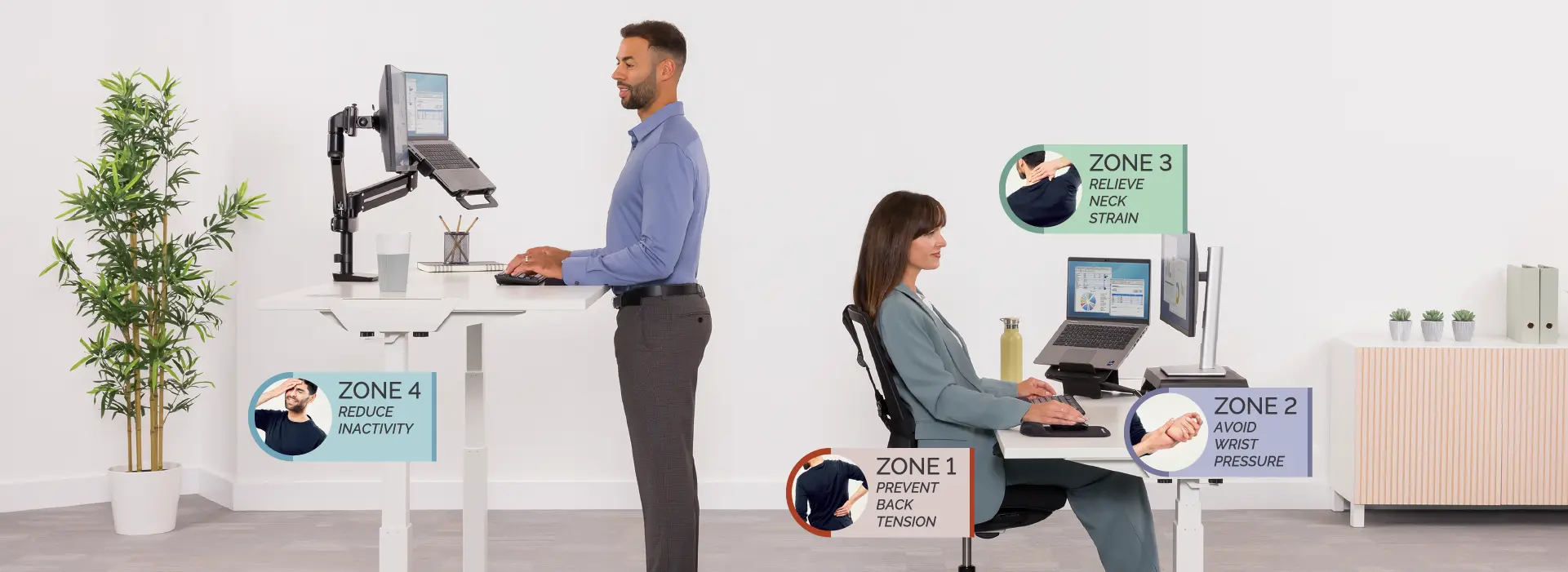
Integrating the Fellowes 4 Zone Approach ® for the ultimate home office setup
Once you’ve completed the assessment, the Fellowes 4 Zone Approach ®
offers a practical framework to guide your ergonomic setup, helping to reduce strain and improve overall well-being:

Sitting in a chair without adequate support can lead to poor circulation and back pain.
It’s recommended that you sit upright with relaxed shoulders, ensuring your back stays in contact with the chair. Your knees should be at or slightly below hip level, with your feet flat on the floor.
Using a seat cushion, footrest, or back and lumbar support can help you maintain a comfortable, ergonomic posture and prevent back strain.

Typing on a keyboard or using a mouse can lead to pain and discomfort in your hands, wrists, arms, and shoulders.
Be sure to keep your forearms parallel to the desk surface and your wrists in a neutral position. Ensure your shoulders and arms are relaxed, with your elbows close to your body.
Using a wrist rest or a vertical mouse can help maintain a neutral and relaxed hand position, reducing wrist strain.

Zone 3 focuses on relieving pressure in the neck region. Leaning forward or tilting your head up or down to view your screen or documents can put unnecessary strain on your neck and back.
Screens and documents should be positioned at arm's length to reduce eye and neck strain and make sure your eyes align with the top of your screen and documents.
Monitor stands, monitor arms, laptop stands, and document holders are designed to elevate your screen and documents, promoting comfortable viewing and helping to relieve neck strain.

Sitting for extended periods at your desk can contribute to health issues like obesity, high blood pressure, and heart disease. Regularly alternating between sitting and standing can help you stay more active while working.
Whether sitting or standing, it's important to maintain proper ergonomic posture and take regular breaks.
A height-adjustable desk or sit-stand desk converter can help you incorporate more movement into your daily routine.

Messy cluttered workspaces can cause stress, reduce productivity and create tripping and stretching hazards.
Cable managers and CPU holders aim to keep your equipment tangle free and hidden out of sight, maximising valuable workspace.
Desktop power solutions keep charging sockets and USB ports at your fingertips, avoiding the need to bend and twist under desks looking for power outlets.
Essential ergonomic products for your home office
Ergonomic chairs
An adjustable ergonomic chair is one of the most crucial elements of a comfortable home office. Back and lumbar support can be added to almost any chair, changing it from a potential hazard to an ergonomic solution.
Adjustable desks
Sit-stand desks allow you to alternate between sitting and standing throughout the workday, helping to reduce the negative effects associated with sitting for long periods. The flexibility an adjustable desk gives you promotes better circulation around your body, while also reducing back pain, and enhancing focus
Monitor stands
Monitor stands help to ensure your screen is always at the correct height while you are at your desk. Ensure your eyes are in line with the top of your screen/s and documents to reduce strain on your neck
Keyboards and mice
Ergonomic keyboards, wrist rests, mousepads and mice are designed to reduce strain in the wrist and are key components for a pain-free workday.
It's time to achieve the perfect ergonomic setup in your home office
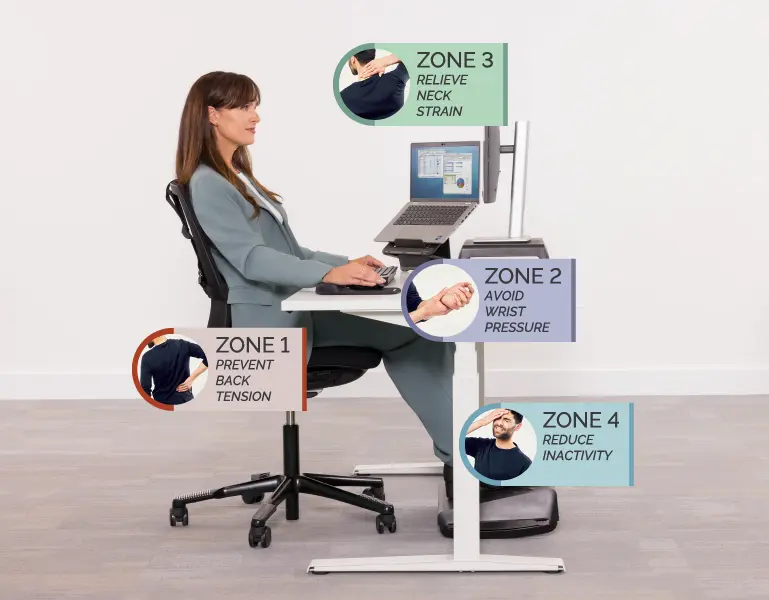
The Fellowes Workspace Zone Approach®
has been produced to help you achieve the best ergonomics in your workspace environment. With the right posture, positioning and equipment, you can significantly reduce the strain on your body while boosting overall productivity.
Ergonomic products like adjustable desks, back and lumbar supports and monitor stands all make a huge difference to the comfort you can achieve while in your home office setup. It is imperative that you mix and match the products to create a workspace that supports your body and mind.
But before you begin making changes, we advise you to take the essential first step by completing the Fellowes Healthy Workstation Assessment. You will find the assessment to be quick, personalised, and able to provide you with the details of how exactly you can improve your home office setup.
Implementing a posture-first policy should not be a secondary thought, it is a policy that can help you now and, in the future, so don’t waste another moment.